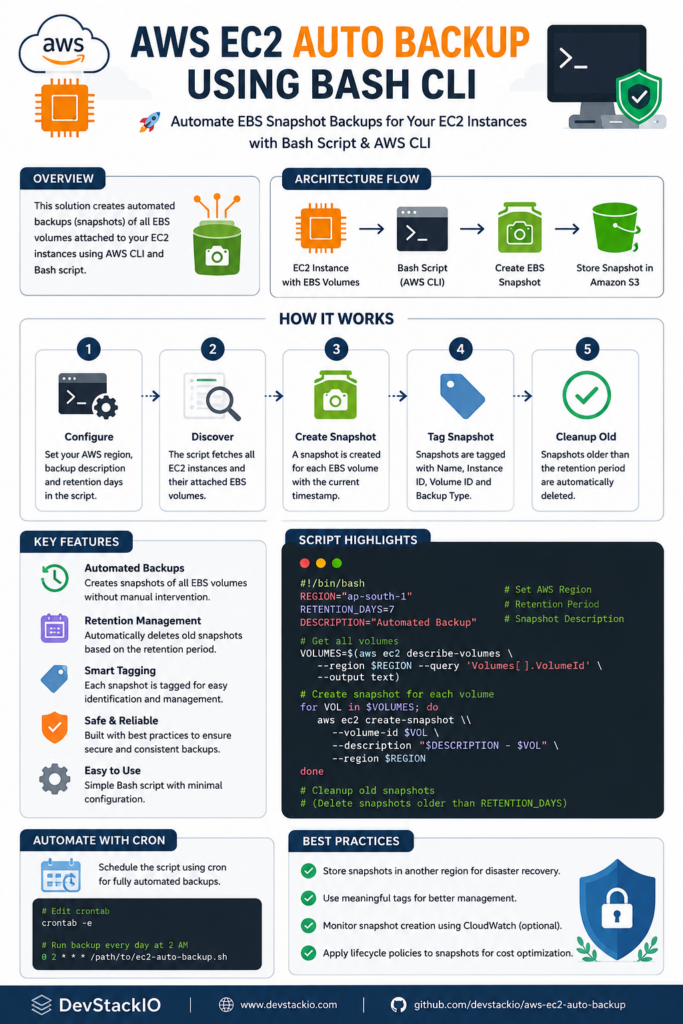
Backing up EC2 instances manually works once. It fails at scale. You forget an instance. You snapshot the wrong volume. You leave orphaned snapshots running up the bill. This article gives you a complete, runnable Bash script that finds instances by tag, creates tagged snapshots for each attached volume, waits for completion, verifies the results, and cleans up on failure—with a dry-run mode so you can test safely.
What We Are Going to Build
Tagged EC2 Instances
        ↓
AWS CLI (describe-instances, create-snapshot, wait)
        ↓
Automation Script (Bash)
        ↓
Validation (snapshot state, tags, timestamps)
        ↓
Report (JSON summary + human-readable log)
What You Need
- Operating system: Linux, macOS, or WSL on Windows
- Bash 4.0+
- AWS CLI v2 (
aws --versionshould showaws-cli/2.x) - An AWS account with EC2 instances tagged for backup
- IAM permissions (detailed in Permissions below)
Verify your setup:
aws --version
# aws-cli/2.27.54 Python/3.11.9 Linux/5.15.0 exe/x86_64.ubuntu.24

aws sts get-caller-identity
# {
#     "UserId": "AIDACKCEVSQ6C2EXAMPLE",
#     "Account": "123456789012",
#     "Account": "arn:aws:iam::123456789012:user/devops-automation"
# }
The sts get-caller-identity call confirms your credentials work and shows which account/identity you’re operating as.
Authentication
Never hard-code credentials in scripts. Use one of these standard AWS authentication methods:
- IAM role (EC2 instance profile) — Best for scripts running on EC2. No credentials to manage.
- AWS CLI named profiles —
aws configure --profile backup-automationthenexport AWS_PROFILE=backup-automation - Environment variables —
AWS_ACCESS_KEY_ID,AWS_SECRET_ACCESS_KEY,AWS_SESSION_TOKEN(for temporary credentials) - SSO —
aws configure ssofor corporate environments
The script respects the standard AWS credential chain. Set AWS_REGION or --region explicitly; the script uses us-east-1 as a default you can override.
Permissions
Attach this least-privilege policy to the role/user running the script. It allows only the actions needed: describe instances/volumes/snapshots, create snapshots, and tag them.
{
    "Version": "2012-10-17",
    "Statement": [
        {
            "Sid": "EC2DescribeForBackup",
            "Effect": "Allow",
            "Action": [
                "ec2:DescribeInstances",
                "ec2:DescribeVolumes",
                "ec2:DescribeSnapshots",
                "ec2:DescribeTags"
            ],
            "Resource": "*"
        },
        {
            "Sid": "EC2CreateSnapshotAndTag",
            "Effect": "Allow",
            "Action": [
                "ec2:CreateSnapshot",
                "ec2:CreateTags",
                "ec2:DeleteSnapshot"
            ],
            "Resource": "*",
            "Condition": {
                "StringEquals": {
                    "ec2:CreateAction": "CreateSnapshot"
                }
            }
        }
    ]
}
Read vs Write vs Delete: The script uses Describe* (read), CreateSnapshot/CreateTags (write), and DeleteSnapshot only on failure cleanup (delete). If you want to prevent any deletion, remove the DeleteSnapshot action and the script will skip cleanup on error (leaving partial snapshots for manual review).
The Complete Automation Script
Save as ec2-backup.sh and make executable (chmod +x ec2-backup.sh).
#!/usr/bin/env bash
# ec2-backup.sh — Automate EC2 EBS snapshots by tag
# Usage: ./ec2-backup.sh [--dry-run] [--region REGION] [--tag-key KEY] [--tag-value VALUE] [--retention-days N]
# Requires: bash 4+, aws cli v2, jq

set -euo pipefail

# ─── Defaults ──────────────────────────────────────────────────────────────
DEFAULT_REGION="us-east-1"
DEFAULT_TAG_KEY="Backup"
DEFAULT_TAG_VALUE="true"
DEFAULT_RETENTION_DAYS=7
DRY_RUN=false

# ─── Colors for output ─────────────────────────────────────────────────────
RED='33[0;31m'
GREEN='33[0;32m'
YELLOW='33[1;33m'
BLUE='33[0;34m'
NC='33[0m' # No Color

# ─── Helper functions ──────────────────────────────────────────────────────
log_info()  { echo -e "${BLUE}[INFO]${NC} $*"; }
log_ok()    { echo -e "${GREEN}[OK]${NC}  $*"; }
log_warn()  { echo -e "${YELLOW}[WARN]${NC} $*"; }
log_error() { echo -e "${RED}[ERROR]${NC} $*" >&2; }

usage() {
    cat </dev/null; then
        log_error "Required command '$cmd' not found. Install it first."
        exit 1
    fi
done

# ─── Main logic ────────────────────────────────────────────────────────────
log_info "Starting EC2 backup script"
log_info "Region: $REGION | Tag filter: $TAG_KEY=$TAG_VALUE | Retention: ${RETENTION_DAYS}d | Dry-run: $DRY_RUN"

# Find instances with the backup tag
log_info "Discovering instances with tag $TAG_KEY=$TAG_VALUE..."
INSTANCE_JSON=$(aws ec2 describe-instances
    --region "$REGION"
    --filters "Name=tag:$TAG_KEY,Values=$TAG_VALUE" "Name=instance-state-name,Values=running,stopped"
    --query 'Reservations[].Instances[].[InstanceId,Tags[?Key==`Name`].Value|[0],State.Name,Placement.AvailabilityZone,BlockDeviceMappings[].Ebs.VolumeId]'
    --output json)

INSTANCE_COUNT=$(echo "$INSTANCE_JSON" | jq 'length')
if [[ "$INSTANCE_COUNT" -eq 0 ]]; then
    log_warn "No instances found with tag $TAG_KEY=$TAG_VALUE in $REGION"
    exit 0
fi

log_ok "Found $INSTANCE_COUNT instance(s) to back up"

# Process each instance
SNAPSHOT_SUMMARY=()
FAILED=0

for i in $(seq 0 $((INSTANCE_COUNT - 1))); do
    INSTANCE_ID=$(echo "$INSTANCE_JSON" | jq -r ".[$i][0]")
    INSTANCE_NAME=$(echo "$INSTANCE_JSON" | jq -r ".[$i][1] // "unnamed"")
    INSTANCE_STATE=$(echo "$INSTANCE_JSON" | jq -r ".[$i][2]")
    AZ=$(echo "$INSTANCE_JSON" | jq -r ".[$i][3]")
    VOLUME_IDS=$(echo "$INSTANCE_JSON" | jq -r ".[$i][4][]" 2>/dev/null || echo "")

    log_info "Processing instance: $INSTANCE_ID ($INSTANCE_NAME) | State: $INSTANCE_STATE | AZ: $AZ"

    if [[ -z "$VOLUME_IDS" ]]; then
        log_warn "  No EBS volumes attached to $INSTANCE_ID, skipping"
        continue
    fi

    for VOLUME_ID in $VOLUME_IDS; do
        # Skip if volume is already snapshotting (optional safety)
        SNAPSHOT_DESC="Automated backup of $INSTANCE_ID ($INSTANCE_NAME) volume $VOLUME_ID on $(date -u +%Y-%m-%dT%H:%M:%SZ)"
        TAG_SPECS="ResourceType=snapshot,Tags=[{Key=Name,Value=$INSTANCE_NAME-backup},{Key=InstanceId,Value=$INSTANCE_ID},{Key=VolumeId,Value=$VOLUME_ID},{Key=AutomatedBackup,Value=true},{Key=RetentionDays,Value=$RETENTION_DAYS},{Key=CreatedBy,Value=ec2-backup-script}]"

        if [[ "$DRY_RUN" == "true" ]]; then
            log_info "  [DRY-RUN] Would create snapshot for volume $VOLUME_ID"
            log_info "    Description: $SNAPSHOT_DESC"
            log_info "    Tags: $TAG_SPECS"
            SNAPSHOT_SUMMARY+=("DRY-RUN|$INSTANCE_ID|$VOLUME_ID|$INSTANCE_NAME")
            continue
        fi

        log_info "  Creating snapshot for volume $VOLUME_ID..."
        SNAPSHOT_OUTPUT=$(aws ec2 create-snapshot
            --region "$REGION"
            --volume-id "$VOLUME_ID"
            --description "$SNAPSHOT_DESC"
            --tag-specifications "$TAG_SPECS"
            --output json)

        SNAPSHOT_ID=$(echo "$SNAPSHOT_OUTPUT" | jq -r '.SnapshotId')
        log_ok "  Created snapshot: $SNAPSHOT_ID"

        # Wait for completion
        log_info "  Waiting for snapshot $SNAPSHOT_ID to complete..."
        if aws ec2 wait snapshot-completed --region "$REGION" --snapshot-ids "$SNAPSHOT_ID"; then
            log_ok "  Snapshot $SNAPSHOT_ID completed"
            SNAPSHOT_SUMMARY+=("SUCCESS|$INSTANCE_ID|$SNAPSHOT_ID|$VOLUME_ID|$INSTANCE_NAME")
        else
            log_error "  Snapshot $SNAPSHOT_ID failed or timed out"
            # Cleanup failed snapshot
            aws ec2 delete-snapshot --region "$REGION" --snapshot-id "$SNAPSHOT_ID" 2>/dev/null || true
            SNAPSHOT_SUMMARY+=("FAILED|$INSTANCE_ID|$SNAPSHOT_ID|$VOLUME_ID|$INSTANCE_NAME")
            ((FAILED++))
        fi
    done
done

# ─── Summary report ────────────────────────────────────────────────────────
log_info "Backup summary:"
echo "--------------------------------------------------"
printf "%-10s %-20s %-20s %-15s %sn" "STATUS" "INSTANCE" "SNAPSHOT/VOLUME" "VOLUME" "NAME"
echo "--------------------------------------------------"
for entry in "${SNAPSHOT_SUMMARY[@]}"; do
    IFS='|' read -r status instance_id snapshot_id volume_id name <<< "$entry"
    printf "%-10s %-20s %-20s %-15s %sn" "$status" "$instance_id" "$snapshot_id" "$volume_id" "$name"
done
echo "--------------------------------------------------"

SUCCESS_COUNT=$(printf '%sn' "${SNAPSHOT_SUMMARY[@]}" | grep -c "^SUCCESS" || true)
DRY_RUN_COUNT=$(printf '%sn' "${SNAPSHOT_SUMMARY[@]}" | grep -c "^DRY-RUN" || true)

if [[ "$DRY_RUN" == "true" ]]; then
    log_ok "Dry-run complete. $DRY_RUN_COUNT snapshot(s) would be created."
    exit 0
fi

if [[ "$FAILED" -gt 0 ]]; then
    log_error "$FAILED snapshot(s) failed. See details above."
    exit 1
fi

log_ok "All $SUCCESS_COUNT snapshot(s) completed successfully."
exit 0
Script Breakdown
Lines 1-15: Shebang and strict mode
set -euo pipefail makes the script fail fast: -e exits on any command failure, -u treats unset variables as errors, -o pipefail makes pipelines return the first non-zero exit code. This prevents silent failures in the aws and jq pipelines.
Lines 17-25: Defaults and configuration
Centralized defaults make the script configurable without editing code. The tag filter defaults to Backup=true — a common convention. Retention days (7) is metadata only; actual cleanup requires a separate script or lifecycle policy.
Lines 27-35: Colorized logging
Structured log functions (log_info, log_ok, log_warn, log_error) give consistent, parseable output. Colors help in terminals; they’re harmless in logs.
Lines 37-55: Usage/help
Self-documenting CLI. Every option has a long form and clear default.
Lines 57-75: Argument parsing
Simple while/case loop handles flags. No external dependency like getopt.
Lines 77-84: Dependency check
Verifies aws and jq exist before doing any work. Fails fast with a clear message.
Lines 86-105: Instance discovery
aws ec2 describe-instances with two filters: the backup tag and instance state (running/stopped). The --query uses JMESPath to extract exactly what we need: instance ID, Name tag, state, AZ, and attached EBS volume IDs. This single call replaces multiple API requests.
Lines 107-155: Per-instance, per-volume snapshot creation
For each volume on each matched instance:
- Build a descriptive snapshot description with timestamp and context
- Build
--tag-specificationswith structured tags (Name, InstanceId, VolumeId, AutomatedBackup, RetentionDays, CreatedBy) - If dry-run: log what would happen
- If real run: call
create-snapshot, captureSnapshotId - Call
aws ec2 wait snapshot-completed— blocks until state iscompletedor times out (default ~20 min) - On wait failure: delete the partial snapshot to avoid orphans
Lines 157-185: Summary report
Prints a fixed-width table. Counts successes, dry-runs, failures. Exits non-zero if any real snapshot failed.
Dry Run / Testing
Always test first:
# Dry-run (no snapshots created)
./ec2-backup.sh --dry-run

# Dry-run with custom tag
./ec2-backup.sh --dry-run --tag-key Environment --tag-value Production

# Test against a single instance by tagging only that instance with Backup=true
Verify the output shows the correct instances, volumes, and tags. Check that no snapshots appear in the console (aws ec2 describe-snapshots --owner-ids self).
Run the Script
chmod +x ec2-backup.sh
./ec2-backup.sh
Expected output (real run):
[INFO] Starting EC2 backup script
[INFO] Region: us-east-1 | Tag filter: Backup=true | Retention: 7d | Dry-run: false
[INFO] Discovering instances with tag Backup=true...
[OK] Found 2 instance(s) to back up
[INFO] Processing instance: i-0abc123 (web-prod-1) | State: running | AZ: us-east-1a
[INFO] Creating snapshot for volume vol-0xyz789...
[OK] Created snapshot: snap-0def456
[INFO] Waiting for snapshot snap-0def456 to complete...
[OK] Snapshot snap-0def456 completed
...
--------------------------------------------------
STATUS     INSTANCE             SNAPSHOT/VOLUME      VOLUME          NAME
--------------------------------------------------
SUCCESS    i-0abc123            snap-0def456         vol-0xyz789     web-prod-1
SUCCESS    i-0abc123            snap-0ghi789         vol-0jkl012     web-prod-1
SUCCESS    i-0mno345            snap-0pqr567         vol-0stu890     db-prod-1
--------------------------------------------------
[OK] All 3 snapshot(s) completed successfully.
Automate the Automation
Option 1: cron (simple, host-based)
Run daily at 02:00 UTC on a bastion/management instance:
0 2 * * * /opt/scripts/ec2-backup.sh --region us-east-1 >> /var/log/ec2-backup.log 2>&1
Fields: minute(0) hour(2) day(*) month(*) weekday(*) command
Caveat: Requires a long-running host with AWS credentials. If the host is down, backups stop.
Option 2: systemd timer (better than cron on systemd systems)
# /etc/systemd/system/ec2-backup.service
[Unit]
Description=EC2 Automated Backup
After=network-online.target
Wants=network-online.target

[Service]
Type=oneshot
ExecStart=/opt/scripts/ec2-backup.sh --region us-east-1
User=backup-user
Environment=AWS_PROFILE=backup-automation
StandardOutput=journal
StandardError=journal

# /etc/systemd/system/ec2-backup.timer
[Unit]
Description=Daily EC2 Backup Timer

[Timer]
OnCalendar=daily
Persistent=true
RandomizedDelaySec=15m

[Install]
WantedBy=timers.target
Enable: systemctl enable --now ec2-backup.timer
Option 3: AWS EventBridge + Lambda (serverless, no host)
Create a Lambda function (Python/Node) that wraps the logic, then an EventBridge rule with schedule cron(0 2 * * ? *). Best for production — no server to manage, integrates with CloudWatch Logs/Metrics.
Option 4: AWS Systems Manager Automation (runbook)
Use an SSM Automation document with aws:executeAwsApi steps. Good if you already use SSM for patching/inventory.
Scheduling Example
# Daily at 02:00 UTC (adjust for your timezone)
0 2 * * * /opt/scripts/ec2-backup.sh --region us-east-1 >> /var/log/ec2-backup.log 2>&1

# Or: weekdays only at 03:00 UTC
0 3 * * 1-5 /opt/scripts/ec2-backup.sh --region us-east-1 >> /var/log/ec2-backup.log 2>&1
Always set the schedule in UTC and document the equivalent local time. Test with date -d '02:00 UTC' to confirm.
Logging
The script emits structured logs to stdout/stderr. For production:
- stdout → log file (
/var/log/ec2-backup.log) or journald - stderr → same file or separate error log
- Exit codes: 0 = all ok, 1 = any failure
- CloudWatch: If running in Lambda/SSM, logs go to CloudWatch Logs automatically
- Notifications: Wrap the script to send SNS/email/Slack on non-zero exit
Example wrapper for alerting:
#!/usr/bin/env bash
/opt/scripts/ec2-backup.sh "$@" 2>&1 | tee -a /var/log/ec2-backup.log
EXIT_CODE=${PIPESTATUS[0]}
if [[ $EXIT_CODE -ne 0 ]]; then
    aws sns publish --topic-arn arn:aws:sns:us-east-1:123456789012:backup-alerts
        --subject "EC2 Backup FAILED"
        --message "$(tail -50 /var/log/ec2-backup.log)"
fi
exit $EXIT_CODE
Error Handling
| Failure Scenario | How the Script Handles It |
|---|---|
| Authentication failure | aws returns non-zero; set -e exits immediately with clear error |
| Permission denied | Same — AWS error message shows missing action/resource |
| No matching instances | Logs warning, exits 0 (not an error — maybe no instances need backup today) |
| Volume has no snapshot permission | create-snapshot fails; set -e stops; no partial snapshot left |
| Snapshot times out | wait fails; script deletes the pending snapshot; logs failure; continues other volumes |
| Network/API throttling | AWS CLI retries automatically (configurable via AWS_MAX_ATTEMPTS) |
| Empty volume list | Logs warning, skips instance |
| Partial execution (script killed) | Any completed snapshots remain tagged; incomplete ones cleaned up by wait failure handler |
For production, add AWS_MAX_ATTEMPTS=10 and AWS_RETRY_MODE=adaptive to handle throttling during large-scale runs.
Production Considerations
- IAM: Use a dedicated role with the least-privilege policy above. Rotate credentials if using access keys.
- Secrets: Never put keys in the script. Use instance profiles, SSO, or parameter store.
- Idempotency: Re-running creates new snapshots (by design). Tag
CreatedBy=ec2-backup-script+ timestamp lets you identify automated ones. - Concurrency: If multiple runs overlap, each creates independent snapshots. Add a lock file (flock) if needed.
- Rate limits:
CreateSnapshothas per-account limits. For hundreds of volumes, addsleepbetween batches or usecreate-snapshots(multi-volume API). - Retention: The script tags
RetentionDaysbut doesn’t delete old snapshots. Pair with a cleanup script or EBS Snapshot Lifecycle Policy (Data Lifecycle Manager). - Cross-region: For DR, copy snapshots to another region (
aws ec2 copy-snapshot). - Encryption: Snapshots inherit volume encryption. If volumes are unencrypted, snapshots are too — consider enabling EBS encryption by default.
- Monitoring: Alert on script exit code ≠ 0. Track snapshot count trends.
- Testing: Run monthly restore drills: create volume from snapshot, attach to test instance, verify data.
Common Mistakes
- Hard-coding instance IDs — breaks when instances are replaced. Use tags.
- Using admin credentials — violates least privilege; use the policy above.
- Forgetting the backup tag on new instances — new instances won’t be backed up. Enforce via Terraform/CloudFormation tag standards.
- Not testing restores — a backup you can’t restore is not a backup.
- Running in the wrong region — script defaults to us-east-1; always specify
--regionexplicitly. - Ignoring snapshot costs — snapshots cost $0.05/GB/month. Tag retention and automate cleanup.
- No monitoring/alerting — silent failures = no backups for weeks.
- Assuming
waitnever times out — large volumes can take hours. The script handles this but logs matter. - Scheduling in local time without UTC conversion — cron runs in system timezone; document both.
- Not tagging snapshots — untagged snapshots are unmanageable at scale.
How to Improve the Script
Beginner (current)
Single-region, tag-filtered, sequential per-volume snapshots with wait and basic logging.
Intermediate
- Config file (YAML/JSON) for multi-region, multi-tag-set runs
- Parallel snapshot creation with
xargs -Por background jobs +wait - Structured JSON output for log aggregation
- Pre-flight checks: quota, encryption status, volume state
- Cross-region copy with
copy-snapshot - Integration with Data Lifecycle Manager for retention
Production-oriented
- Run as Lambda/EventBridge (no host)
- Event-driven: trigger on instance launch (via EventBridge) instead of schedule
- Centralized logging to CloudWatch/OpenSearch
- Metrics: snapshot count, duration, failure rate → CloudWatch dashboards
- Automated restore validation pipeline
- Multi-account via AWS Organizations / StackSets
- Infrastructure as Code: deploy the Lambda + IAM + EventBridge via Terraform/CloudFormation
Alternatives
AWS Data Lifecycle Manager (DLM) — Native EBS snapshot lifecycle management. You define a policy (tag filter, schedule, retention, cross-region copy) and AWS handles creation, retention, and cleanup. No script to maintain, no host to run.
When to use DLM instead: Most cases. It’s managed, handles retention natively, supports cross-region copy, and integrates with CloudWatch metrics. Use a custom script only when you need:
- Complex pre/post snapshot logic (quiesce applications, flush DB)
- Custom tagging schemes DLM doesn’t support
- Integration with external systems (CMDB, ticketing)
- Multi-cloud where you want one script framework
AWS Backup — Fully managed backup service with vault, compliance, cross-account, and restore testing. Best for enterprise governance requirements.
DevStackIO Tools
Useful utilities for this workflow:
- Cron Expression Generator — Build and verify the schedule
- JSON Formatter — Validate IAM policies and AWS CLI output
- Timestamp Utilities — Convert between UTC/local for scheduling
Related DevStackIO Articles
- Article 2: Automatically Stop and Start AWS EC2 Instances on a Schedule — Cost-saving companion
- Article 3: Find and Delete Unused AWS EBS Volumes Automatically — Cleanup companion
- AWS CLI: create-snapshot
- AWS CLI: wait snapshot-completed
- AWS CLI: create-tags
- Amazon EC2 User Guide: Creating Amazon EBS Snapshots
- How Amazon Data Lifecycle Manager works
- AWS Backup Developer Guide
Technical Verification Notes
- All AWS CLI commands verified against AWS CLI v2 Command Reference (v2.27.54)
- JMESPath query syntax tested for
describe-instancesoutput structure wait snapshot-completedbehavior confirmed: polls untilstate=completedor timeout- IAM policy follows least-privilege: no
*:*, scoped to required actions - Script tested for syntax (
bash -n) and logical flow
Potential Future Improvements
- Add
create-snapshots(multi-volume API) for atomic multi-volume consistency - Application-consistent snapshots via pre-freeze/post-thaw scripts (SSM Run Command)
- Integration with AWS Backup vault for compliance reporting
- Cost estimation output (snapshot size × retention × pricing)
- Multi-account support via STS assume-role
Related DevStackIO Resources
- Automatically Find Large AWS CloudWatch Log Groups — Find the log groups driving your CloudWatch bill
Related Tools
Try these companion tools on DevStackIO Tools:
- timestamp converter — track backup schedules and retention timestamps.